



 Back to Blog
How to Build a Digital Touchpoint Map for Your Content Strategy

The key to a content strategy that works is making your BEST impression every time a customer runs into your brand, from the first time they hear your name to the day they recommend you to a friend.
Every one of those moments is a touchpoint, whether it’s a Google search, a LinkedIn post, a review, a sales call, or an onboarding email. Each one is a chance to answer what that person needs answered right then and give them a reason to take the next step.
The typical content plan skips that thinking. They start from a keyword list or a posting calendar, and nobody stops to ask who’s reading each piece or what they’re trying to decide when they read it.
A touchpoint map fixes that. It plots every place a customer meets your brand against the stages they move through on the way to buying, so you can see where you show up well, where you show up badly, and where you don’t show up at all.
Start by standing where the customer stands
I picked this idea up from Lee Odden’s writing on optimizing social media across the customer lifecycle. What stuck with me was the exercise underneath it. You put yourself in the customer’s shoes, walk through a typical purchase from the first search to the repeat order, and experience the brand the way they do.
It sounds obvious, and it’s the step that gets skipped. Everyone inside a company knows the product too well to see it the way a stranger does.
When you do walk through it, the need behind each stage gets clear fast. Someone comparing options wants proof. Someone who just bought wants to hear they made the right call, and a customer who’s been with you for a year mostly needs a reason, and an easy way, to tell people about you.
Build the map from your data and your customers
The map comes from your own data, your sales and marketing teams, and conversations with customers. Building it takes three passes.
- Map the journey. Lay out the stages a typical customer moves through as they find you, buy from you, and stick around. A lot of businesses fit awareness, consideration, purchase, retention, and advocacy, but yours might look different, especially with a long sales cycle or a subscription. Ask your sales and marketing teams how they see it, then interview a handful of customers and see whether they agree.
- Find every touchpoint. List every place a customer or prospect runs into your brand. The best sources are:
- Your sales and marketing teams, and what’s in your CRM
- Customer interviews, plus sales call recordings if you have them
- Search queries in Google Search Console and referral sources in GA4
- The prompts your buyers would type into ChatGPT, Gemini, and Google’s AI Overviews, and what comes back
- Reviews, Reddit threads, and community conversations about you and your competitors
- Your backlinks and your competitors’ backlinks
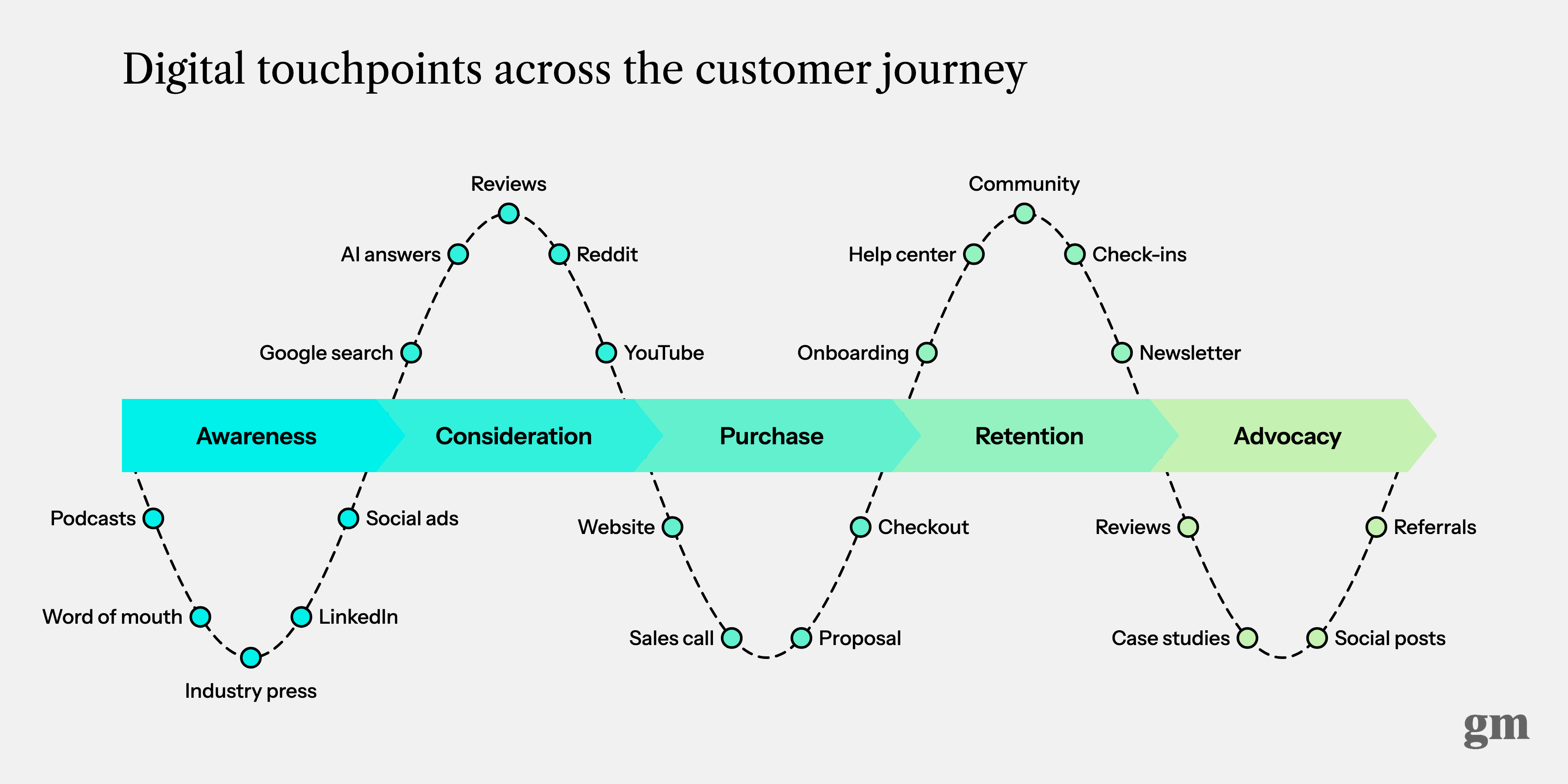
- Plot the touchpoints against the stages. Put each one where it shows up in the journey, the way the diagram above does. Then mark each one as helping the customer at that moment, hurting, or missing.
AI answers belong on the map now
The 2013 version of this map had radio, print, PPC, and community forums on it. Plenty of that still matters. The biggest change since then is how much of consideration happens before anyone reaches your website.
A buyer asks ChatGPT for the best options in your category, reads the Reddit thread Google puts near the top, and skims a few reviews. By the time they land on your site, they’ve already built a shortlist, and you may or may not be on it.
You don’t control that touchpoint the way you control your homepage. What you can do is run the same prompts your buyers would, see what comes back, and fix the pages and sources those answers pull from. That work belongs on the map with everything else.
A map only helps when it’s specific to one business
Take a $3M digital agency. Agency leaders tell me most of their new business comes from referrals, so awareness usually starts with a past client, a partner, or the founder’s LinkedIn posts, with industry events and newsletters filling in the rest.
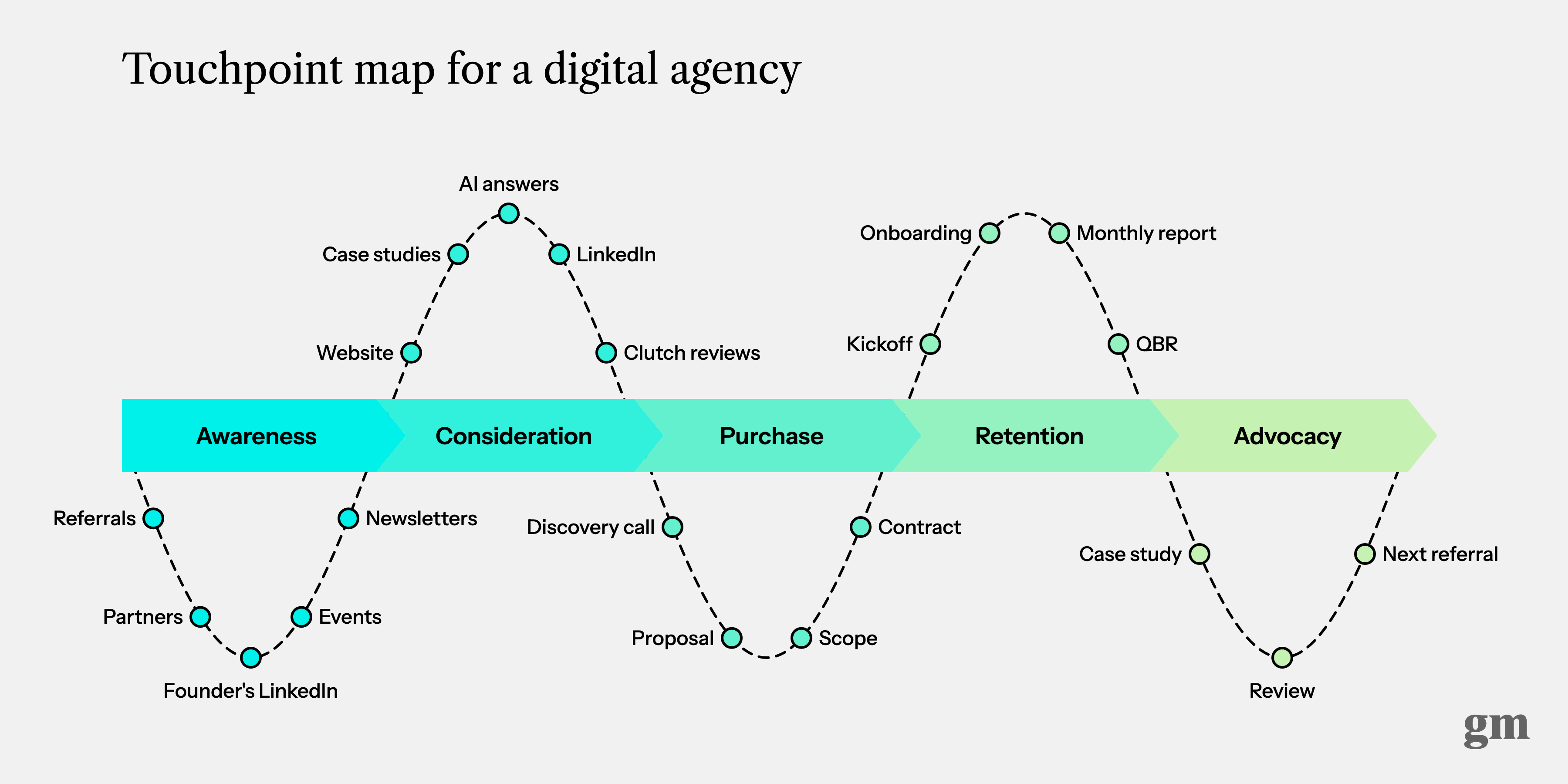
Consideration is where the referral gets checked. The prospect looks at the website and the case studies, scrolls the founder’s LinkedIn, reads the Clutch reviews, and may ask ChatGPT which agencies do this kind of work. A warm referral can lose to a stranger at this stage if the website still describes services the agency stopped selling two years ago.
Purchase is the discovery call, the proposal, and the scope. After the contract, the touchpoints that matter most are ones agencies don’t usually treat as content: the kickoff, the onboarding docs, the monthly report, and the QBR. The monthly report is where renewal gets decided, so it belongs on the map next to the website and the case studies. Advocacy closes the loop with a case study, a review, and the next referral.
That’s the version to build, because it names the exact places your customers meet you, down to the review sites. The general map above shows the shape, and yours should be specific enough to tell you where to spend next month.
The map is only worth it if it changes what you make
The fair criticism of journey maps is that they turn into a workshop poster. A team spends a day with sticky notes, somebody makes it look nice, and nobody opens it again.
The other criticism is that nobody buys in a straight line, and that’s true. People skip stages, loop back, and do half their research on a phone at 11pm. That’s fine, because the map is a coverage check. It shows you which stages you serve well and which ones you’ve left empty.
What keeps it off the wall is using it to make decisions about:
- Which existing content to fix first
- What to make next, and for which stage
- Whether a new channel deserves budget, or an old one deserves to be cut
- Where hand-offs break, like the gap between the sales call and onboarding
- How to turn happy customers into reviews and referrals
Pull the map out every six months
Touchpoints keep changing, so redo the second pass about twice a year. A few years ago nobody had AI answers on their map, and now they sit right in the middle of consideration.
And the next time you’re stuck on what to write, what to put on a landing page, or what to send in an onboarding email, look at the map. It tells you who’s reading and what they need at that moment.
I first published this post in March 2013. This version is rebuilt for 2026, with new diagrams.